
A customer had about 30 new devices that all needed a Windows Autopilot Group Tag before they could go out. The Group Tag decides which deployment profile a device lands in, which means it drives everything that follows: the apps, the policies, the whole out-of-box experience. So it matters, and it has to be right.
The problem is that setting it in the Intune portal is a click-per-device job. Thirty devices is roughly an hour of clicking through the same screens, and the moment there is a next batch you start again.
A year ago my options would have been: do it by hand, or ask a developer to build something and wait. This time I built the tool myself in an afternoon, using Claude Opus 4.8 as the engine. I want to walk you through how that actually went, because the interesting part is not the finished tool. It is the path to it.
Start with the problem, not the solution
I did not start by asking for code. I started by describing what I needed in plain terms. A tool that bulk-assigns Autopilot Group Tags. It should take a list of serial numbers, ideally from a CSV, look the devices up in the tenant, and let me apply a tag to all of them at once. It had to run on a normal Windows machine without an installer, because that is the reality of working at a customer.
From that, Claude proposed the shape: a small PowerShell application with a graphical interface using WinForms, talking directly to the Microsoft Graph API. It matched what I had in mind. PowerShell runs everywhere in our line of work, and Graph is where Autopilot lives. So I had a plan before a single line of code existed.
The first version, and the first wall
The first working version looked up devices by asking Graph to filter server-side, something like “give me the device where the serial number contains this value.” Clean on paper.
I ran it against the real tenant. It broke.
That is the part that usually gets left out: the first version rarely survives contact with a real environment. The windowsAutopilotDeviceIdentities endpoint did not handle that contains filter reliably, and it got worse with the dashed serial numbers our virtual machines use, the long ones with blocks of digits separated by dashes.
So I fed back exactly what failed and showed what the serials actually looked like, and I changed the approach. Instead of filtering on the server, the tool now fetches every Autopilot device in the tenant once, pages through the results properly by following the @odata.nextLink until there are no more, and then matches locally.
I made the matching deliberately forgiving, in three passes. First an exact match. If that fails, strip out all dashes and spaces and compare again. If that still fails, fall back to a partial match on the normalized value. That handles the messy reality of how serials get typed, pasted, and formatted differently in different places. After that change, lookups worked every time.
The authentication problem
This was the bigger wall, and the most interesting one.
The tool needs to sign in to Graph. The normal route is to use Microsoft’s default sign-in app, where the user logs in interactively and the tool acts on their behalf. The customer’s tenant blocked that default app. On top of that, their own app registration had no redirect URI configured, and I could not add one. Interactive sign-in needs that redirect URI to work, so that door was closed too.
I pasted the actual sign-in errors and explained what was and was not allowed in their environment. Working through it, I landed on a different model: app-only authentication, also called client credentials. Instead of a user signing in, the app authenticates as itself using a client secret. Their app registration already had the right application permission for this, DeviceManagementServiceConfig.ReadWrite.All, with admin consent. That is exactly what app-only needs, and it sidestepped both blockers.
The trade-off with app-only is that you are holding a secret, and a secret in a script is a liability. So I handled it carefully. The secret never lives in the code. The user enters it once at runtime in a masked field, and if they choose to remember it, it gets stored encrypted on that specific machine for that specific Windows account, in a location deliberately kept out of any synced folder. I knew the environment and the security expectations, and I leaned on Claude for the implementation patterns to match them.
Being honest about the trade-off
App-only auth solved the sign-in problem, but it is not a free win, and I think it is worth being clear about that.
When you authenticate as the app instead of as a user, the tool acts with the app’s permissions across the whole tenant, independent of who is running it. The convenience is obvious. The risk is just as real: anyone who can launch the tool with that secret can change Group Tags tenant-wide, and the actions are tied to the app, not to a person. You lose the per-user accountability you normally rely on.
That is why the secret handling matters as much as it does, and why the secret has a hard expiry date rather than living forever. For a contained provisioning run, with one person and a tightly held secret, app-only was the pragmatic call.
For wider or recurring use by a team, the more responsible model is delegated access scoped to a security group. Each person signs in as themselves, acts within their own Intune rights, and every change is traceable to a real account. That is the direction I would take this if more than one person needed it, and it is a good reminder that the convenient path and the accountable path are not always the same one.
Making it usable, not just functional
A working script is not the same as a tool someone wants to use. So I spent real time on the interface.
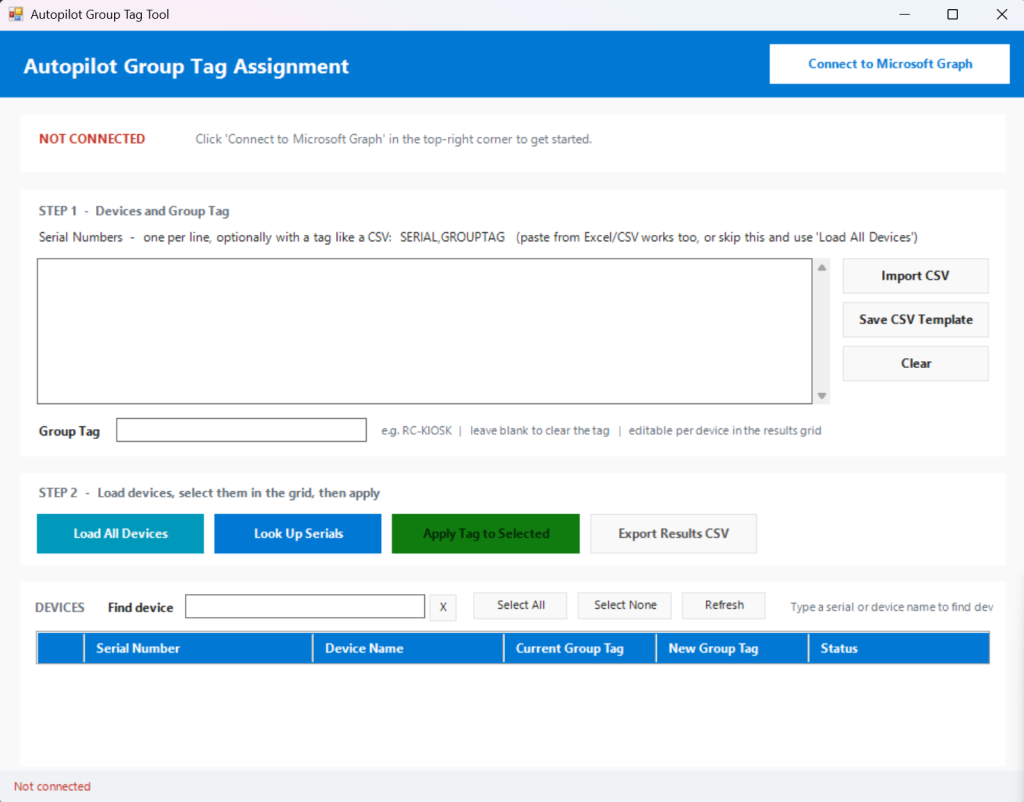
The result is a single window with a clear flow: connect, paste or import your serial numbers, load the devices, then a results grid where you select the ones you want and apply the tag. The grid lets you edit the tag per device, so you are not locked into one value for the whole batch. A CSV import maps a SerialNumber and optional GroupTag column straight in. A live search filters the loaded devices as you type, using the same dash-and-space-insensitive matching as the lookup, so finding one device in a long list is instant.
The actual write back to Intune is one focused call per device, a POST to the device’s updateDeviceProperties with the new group tag. Everything else in the tool exists to make getting to that one call fast, safe, and hard to get wrong.
What this changed for me
The finished tool does in about 30 seconds what used to take an hour. Connect, import, select, apply, done. It is a single file with a launcher, no installer, no dependencies beyond one Graph module it installs itself if it is missing.
But the tool is almost beside the point. The shift is in the path I just walked you through. I was the one who knew the customer, ran it against reality, recognized why the filter and the sign-in were failing, and decided what was good enough to ship. Claude turned that knowledge into working code and caught the technical traps before I hit them. It even wrote the documentation, the README and the handoff notes, work I would normally skip because there is never time.
That is the real change. Building a small, specific, internal tool used to be a project you had to justify and schedule. Now it is something you can do between two meetings, as the person who actually understands the problem.
And that is what this blog is about. Not whether AI can write code, but what it changes about how we work once it can.